


%201.jpg)

4 Ways to Sell More Experiences Through Offline Channels
This post was written by Josh Oakes as part of our Growvember series—focusing on ways to grow your business. In 2007, Josh and his wife started a day tour company in Melbourne, Australia. They had no experience in tourism, no business experience, no networks or support — and no funds. Fast forward seven years and they had grown their business to $2 million+ in annual revenue, before selling the company in 2017 for a seven figure sum. Josh recently launched www.thesunshinetribe.com— helping tour and activity operators and small tourism businesses across the globe build amazing businesses AND create awesome lives for themselves. Here he shares some of his best ways to boost sales — the “old-fashioned” way.In 2018, if you’re not selling your tours and activities online, you’re probably going to struggle to grow your business.Not exactly a ‘visionary’ statement, you may think. And you’d be right. I doubt there are many operators out there prepared to debate the importance of online channels —I’m definitely not.I’ve seen plenty of superb tour operators grow their business to high six and even seven figures by concentrating on growth via SEO, Facebook and Google Ads, Online Travel Agents, and various other online channels.As a tour operator, I knew online channels were critical to the health of our business, and we developed a strong online presence.However, at a time when we were selling more than $2 million in tours annually, approximately 70% of our revenue came via offline channels.So here’s a question for all those tour or activity operators that are currently smashing it out of the park online:How good could your business be if you were complementing those efforts with some serious success through offline channels?With that in mind, here are a few distribution channels you should consider utilizing —plus some tips on how to really make them succeed:
1. Travel Partners
Why should you consider selling your tours through carefully selected global travel agents, travel wholesalers, and inbound tour operators?The international exposure you’ll receive for your tours or activities is next level.The scope that resellers have often goes far beyond the reach of a single tour or activity operator. Good travel partners take part in multiple international trade shows, workshops and sales calls every year.When they’re out there doing deals, meeting potential partners, pitching themselves and building relationships, they’re not only talking about their business.They’re pitching the experiences they use — and they’re using their tourism expertise and experience to pitch your company to the right international travel partners that will love what you have to offer.They offer a reliable source of income.Once your relationship with the right travel partners is in full swing, you’ll discover that the ones you really connect with can deliver a super consistent and reliable revenue stream. This is something you can rely on year in, year out, and will give you the confidence to make smart business decisions.I’ll give you an idea of how this tactic impacted my business. At the time that we were generating over $2 million in annual sales, our top five travel partners were bringing us $700,000 annually. When you looked at our top 10 travel partners, they were worth over $1 million in annual revenue. This revenue had grown by between 11% and 14% for four consecutive years. The consistency in growth made it easy for us to make the decision to sell through these channels. And ultimately, it was a decision that helped propel our business forward.Let’s take a look at the figures from this time:

There it is. The real revenue generated by each of our top travel partners over a one year period. Whatever your business size, travel partners provide an awesome opportunity to make some serious additional revenue.This is the holy grail for a small tour operator.
2. Hotels and Hotel Concierges
In the very early days of our tour business, we knew that one of our long-term strategies would be a focus on travel distribution. But we also had bills to pay and we needed ‘quick wins’ that didn’t cost anything to start generating bookings, other than my time.So we came up with a short-term strategy we could put in place right away — hotels.We knew full well that generating bookings via traditional travel distribution channels was going to take time — time we didn’t have.Hotel concierges were the solution.So how did we do it? The old-fashioned way. I pounded the pavement, I got in front of concierges, I made sure they would remember me and I built awesome personal relationships across the city.Here are a few quick tips to get your phone ringing off the hook with hotel concierge enquiries and bookings:It’s all about relationships. Make life easy for a concierge. Make sure the answer you’re giving is ‘yes, yes, yes’!If you can’t provide exactly what they’re asking of you at short notice, then come up with two or three things you CAN do as an alternative. Make a concierge feel special — ‘I’m only doing this for you’. Be flexible and be resourceful. Once you’re ‘in’ the rewards will come and the bookings will flow.Every hotel is different.Find out how they work. Don’t make assumptions about the way they book tours and educate their hotel guests on tour or activity options. Learn about how they operate. Find out about their hotel guests — are they favored by more international or domestic clients? See if you can tweak what you offer to suit that market better.Be consistent and reliable with your commission payments.This one speaks for itself. Delays in payment could easily see you swapped out for another tour operator, so make sure you’re on top of all the necessary admin.Expect that every guest experience will be fed back to “the desk”.Make your guides fully aware of this. It’s often the concierge’s reputation on the line if they have pushed guests towards your tour. If there’s a problem, bring it to their attention. Don’t let them find out.I always found that it’s the manner in which an issue is handled that matters, rather than the issue itself.
3. Corporate Clients
This market offers some massive opportunities for a tour or activity operator. Team building days, hosting international visitors, pre and post meetings and conferences, reward and recognition days. Christmas parties and end of financial year activities are also a huge market to tap into.Some of the major benefits we found from selling tours and events to the corporate market were:The way it complemented our seasonal tour business.We went nuts with corporate Christmas parties every year — from December 1st right up to December 20th. This connected beautifully with our peak inbound travel season — which kicked in from December 21st right through to the end of January, meaning that December was a bumper month from start to finish.Even if major corporate events don’t line up with your peak season, they can be a great way to boost your revenue during slow periods or fill up off-peak and mid-week tour slots!They can be highly lucrative.Not only are the sales commission-free, but generally the numbers you’re seeing are larger. For us, that translated directly into more revenue and more profits.The market is massive.Consider how many businesses in and around your city potentially have a need for what you offer. In larger companies, there is also scope for multiple annual needs from multiple departments. If you get ‘in’ with, say, one of the major banks, then you could find yourself running company-wide team building days, pre and post conference tours, reward and recognition days, departmental Christmas parties, end of financial year activities and more. So put yourself out there and starting hitting up the big corporate entities in your area.
4. Other Tour Operators
When aiming to grow your business via collaborations with other tour or activity operators, I suggest you start with some basic research of your customer:Where are they coming from? Where are they going next? What are they doing/what did they do in those places? This can be done easily and informally by your tour guides and reported back to you.Start reaching out to tour or activity operators in those regions or destinations. This will allow you to build up a network of tour operators of similar size and style. Start creating a community. Then... be proactive! Take the lead and start collaborating. Create something together with one operator — an agreement, a documented referral process, a collaboration or an incentive... whatever it is, once you’ve done this successfully the first time and have results to show, others will follow and be desperate to collaborate with you.Be the one to make something happen. Hopefully I’ve given you some inspiration in terms of how you can take your tour or activity business to the next level and reach the growth you’ve been striving for.If you enjoyed this article and found it helpful, please take a moment to download our ‘15 Steps to a 7 Figure Tour Business’ HERE. We’ll give you a look 'behind the curtain' into our step-by-step process that allowed us to turn a vague idea into a multi 7 figure tour company. Enjoy!
Want to hear more from Josh and other industry experts? Register below for Growvember - a 2 day online event featuring growth-focused workshops, for tour and activity operators like you!
[button link="http://info.peekpro.com/welcome-to-growvember?speaker_name=peek_blog" type="big" newwindow="yes"] Click here to sign up![/button]

5 Ways to Market Your Escape Room More Effectively
Digital marketing pro, Dan Honkanen of Local Pulse, specializes in helping escape rooms grow their business and online presence. In this post, he shares a few pro tips with us on how best to boost your revenue and reputation — both online and offline.In 2014, there were still only 22 escape rooms in the US. Fast forward a few years, and the industry has exploded with growth. What started as a video game niche in Japan in the early 2000s has grown into a global phenomenon, with over 5000 escape rooms in 90+ countries offering “IRL” escape experiences. There’s no escaping this trend: escape rooms are huge right now. Escape room owners often spend a lot of time, energy and money creating amazing rooms that make players feel like they’re on the set of a big budget Hollywood movie. But too often, those same owners are surprised when they see minimal bookings and low customer footfall once open. The problem? Overlooking their marketing strategies. As a digital marketer that specializes in escape rooms, I’m here to give you a rundown of a few techniques that are essential to the successful marketing and growth of your escape room. Let’s dive in!
1. Show some love to Google My Business
In the past, potential customers would Google you and then click straight through to the homepage of your escape room website. Not anymore. Now, searchers spend more time on your Google My Business page, before deciding whether or not to actually visit your website.Your GMB page (or Knowledge Panel) is essentially your new “homepage”. Here’s an example of what it looks like:

Users can use this panel to click through your photos & videos, check out FAQs, and see user-written reviews. These are vital tools for potential customers to access all the information they need — so make sure you’re keeping track, updating media and posting responses where necessary.

Answer customer questions via the FAQ section

Keep your photo/video section updated with new and enticing media!Pro tip: Name media files with your target search phrase (e.g. escape-room-cleveland-logo.png) for maximum search results!

GMB is also a place for potential customers to read reviews from past guests
Another cool feature of your GMB listing that you may not be utilizing is Google Posts. These are posts where you can promote events, offers and other fun details. Here’s an example:

Every seven days, your Google Posts will expire. So, be sure to hop back in and create a new one. Make sure you use the appropriate type of post (i.e. what’s new, event, offer or product), and there you have it — a super simple way to direct even more customers to your page!Pro tip: In order to accurately track clicks on your posts in Google Analytics, use a URL builder such as this one.It doesn’t matter how much time or money you spent on creating your website. If your GMB page doesn’t convince them to click through to your website, they’ll simply move on to a competitor.The lesson? Don’t neglect your Google My Business page. It may be the last chance you get to make a great first impression.
2. Fewer competitors, more partners!
Too often escape room owners don’t utilize the offerings of their competitors in the best way. This is a unique industry — you only have a limited number of rooms for people to play, and once a customer has played all the rooms at your facility, it’s likely that they won’t return. Many of these players will also ask the escape room owner for recommendations on other escape rooms to try. This is where a partnership is key. Take some time to have fun and try out the other escape rooms in your area. When you’ve identified your favorite(s), why not reach out to the owners to see if they’re interested in a joint promo? An example of this could be: The owner of Escape Room A recommends Escape Room B to players who’ve played all of their games.The owner of Escape Room B may want to further entice those players by letting the owner of Escape Room A provide a special discount code. And vice versa!The lesson? Partnering with other great escape rooms can drive more customers to your business without you having to spend a penny. Win-win!
3. Bump up your reviews
Reviews are vital for any escape room business. You want your customers to be surprised by what’s inside your rooms — that means the information you’re able to put out can be limited. This is where reviews come in: let previous guests entice new customers by expressing what a great time they had inside your escape room!Here are a couple of ways to make sure you’re getting as many reviews as possible: First, ensure you have a system in place which captures the names and email addresses of each of your customers.Every couple of weeks you’ll want to extract the list of customers from the previous few days and upload that into your online review or reputation management tool, if you have one. This will help you to build a positive brand image and online reputation. Once you have your information, you can fire off review request emails to the customers!Every now and then, you should also create social media posts to let your followers know which platforms you’re listed on for reviews. Remember to keep it casual — don’t directly ask for more reviews. Just give them a subtle encouragement by reminding them where they can do it. Check out this example:

Remember, owners and staff can’t review their own business. You also can’t give a negative review to a competitor’s business, unless you actually were a customer and genuinely had a bad experience.You should also make sure you’re not offering any compensation — like discounts or free games — in exchange for reviews. A smart social media campaign that gives players a gentle reminder to review you can be just as effective, and ensures you don’t get in any trouble! The lesson? Don’t just rely on your own marketing content to sell your escape room. User reviews are vital to building trust in your brand and convincing potential customers to make that booking. Tactics to boost your reviews should be an integral part of your marketing strategy.
4. Know your audience — and target them wisely
We’d all love to get our ads out on as many platforms as possible. But sometimes, the budget just won’t allow spending on money on all those paid ads. So, what do you do? Choose your platforms wisely. I always recommend using a maximum of two social media platforms to target. How do you decide which two? Start by considering your location and key demographics. Based in a college town? Trying to reel in young professionals? Sharpen up your Instagram posts. Targeting high school age customers? Get on Snapchat. Want to appeal to families? Head over to Facebook.It may be that you have a mix of demographics, so try to identify your most popular client base and appeal to them through their preferred social media channels. The lesson? Don’t spread your paid marketing too thin. By focusing on specific platforms, you can have a big impact — even if you don’t have a big budget.
5. Consider working with a digital pro
Gone are the days of traditional advertising: billboards, radio ads, flyers. Sure, you can still attract some new players this way, but chances are they’ll be few and far between. Plus, there’s no good way of accurately tracking the results of these techniques.To keep up with the competition, you need to spend time analyzing the competition to see what they’re doing in terms of digital marketing.If a certain competitor is appearing higher than you in the Google search results for a certain term (i.e. “escape room” + city name), there’s a good chance they’re spending more time and/or money to keep up with their digital marketing and remain on top.You should make sure you’re spending serious time keeping up to date with the frequent changes in SEO (Search Engine Optimization) — either that, or consider hiring a digital marketing professional —- like me!
Remember, you’re great at what you do. If entering the confusing world of SEO and digital marketing isn’t exactly your strong suit, don’t be afraid to invest a little in getting advice from a pro. If they can bring more potential customers to your website, you can go back to focusing on what you love — creating and running an awesome escape room!Are you currently running or thinking about starting an escape room? Want more expert tips from Dan? Check out his website here!

Supercharge Your Rental Fleet: 5 Reasons to Rent Electric Bikes
This is a post by Joe Samsel, Rental Fleet Specialist at Rad Power Bikes— North America’s largest electric bike company. Joe has helped a large number of companies improve their rental businesses with e-bikes. Here he shares some of his insight and personal experience on how e-bikes can bring more growth and success to your rental business.From the first pedal stroke on an electric bike (or “e-bike”), people feel the fun of riding a bike again, just like they did when they were a kid. This feeling is partly why we're seeing extreme growth in e-bike popularity worldwide. E-bikes are quickly becoming a must-have for rental shops, retreats and guided tours.Electric bikes may look like a standard bicycle, but don’t be fooled — they feel more like a jet! A battery-operated motor gives riders an extra power boost through levels of pedal assistance, or a half-twist throttle (on-demand power like a scooter). The rider selects as much support as they want to reach a maximum speed of 20 mph and cover up to 45 miles per charge.Electric bikes give people of all abilities the chance to explore without being held back by hills or headwinds: no need to worry about getting too tired or going too far. With e-bikes, your visitors can fully enjoy and appreciate where they’re riding. At the same time, your business can gain new customers and extra exposure by offering one of the hottest modes of transportation. I’ve shared below a few key reasons why YOU should be making e-bike rentals part of your business — and give your growth a turbo boost!
- TAP INTO A BOOMING MARKET
Customers will seek out your e-bikes for a chance to ride the latest trend, but also because not everyone has the ability to own one. Your customers would need to spend $2000-$3000 to purchase their own e-bike — a rental or tour gives them the same experience for around $40-$120. And, it’s much easier for you to start an e-bike tour or rental business, or add e-bikes to an existing operation, than it would be to start a retail store. For example, selling e-bikes through a retail store would cost north of $100,000 just to get started. The investment is much smaller with rentals, and you’ll start earning revenue much faster than trying to sell big-ticket items.

- BROADEN YOUR CUSTOMER BASE
E-bikes level the playing field between riders. They allow everyone from avid cyclists to those who haven’t been on a bike in years to join in on the fun. As multi-generational vacations become more common, this activity is a perfect way for the entire family to have fun together. Teenagers can pedal while Grandpa cruises (or vice versa)!

- INCREASE YOUR ADVERTISING OPTIONS
Being able to advertise and mention e-bikes alone will add a new angle (and keyword) to your advertisements. With carefully designed ads on Google and other search engines, as well as a well-planned promotion on Groupon, LivingSocial and similar websites, you can get customers in right away. In addition, the eye-catching nature of the e-bikes will pull people into your business who are looking to learn more and take a ride!
- OFFER NEW ADVENTURES
No matter where your operation is based, an e-bike can let visitors see it all. They can reach places where cars, buses, walks and even segways can’t take them. With the motor, they can travel long distances, conquer hills, or safely navigate a city. Plus, an e-bike with wider “fat tires” can tackle any terrain, including sandy beaches, gravel roads, mountain trails, or snowy hills. The possibilities are endless!

Find hidden gems with e-bikes — like this beautiful lake in the heart of the North Cascade Mountain Range!
- BOOK MORE GROUPS & TOURS
Since everyone can go at the same pace, group rentals or guided tours are another often requested benefit. No one has to worry about falling behind. Instead, visitors can focus on what’s going on around them and enjoy the tour or scenery. Electric bikes are an exciting revenue generator and a great new add-on to your business. Whether you’re looking for ways to expand your business, offer new tours or find ways to set you apart from your competitors, e-bikes just might be the solution for you! Our active fleets are reporting increases in profits directly related to the introduction of our e-bikes to their business. We’d love to work with you too!You can reach out to Joe via email or visit the Rad Power Bikes website for more information.Here’s what Peek Partner and Rad Power Bikes client Big Sur Adventures had to say: "I needed a bike that would help average people climb the steep hills here. The most economical (and ‘cool’) choice I could find was Rad Power Bikes. It's not uncommon to have one fit rider (who can do just as well without an e-bike) go along with an ordinary rider. But they want to share their bike love with friends & family. The e-bike levels the playing field and gets them together. Customer feedback has been great. Pretty universally, everyone is really excited and has a great time."

How to Hire, Train and Retain the Best Guides: A Tour Operator’s Handbook
In this post, seasoned tour guide and operator Erik Hormann of Vantigo runs us through his best strategies to finding — and keeping — the best tour guides in town. Find more tools to help you with the hiring process at the bottom of this blog!It’s Friday. You finally got around to that dreaded dentist appointment — and it happens to coincide with the start of the morning tour. As you wait for the dentist, you check your phone and see a voicemail from the guide leading the tour. Then a message pops up: are you free for a quick chat after the tour is over? Suddenly you’re more nervous about what your guide is going to say than your impending root canal!As you leave the dentist office, still half numb, you call your guide and get the story. They tell you that ten people showed up for the morning tour — the capacity is only seven. The guide went through his roster and checked everyone in — except a family of three whose names were not on the list. When the guide tried to explain that he had no record of their reservation, the father quickly became agitated.What followed was a sort of 60s-style sit-in protest: the customer standing in front of the van, trying to make the guide conjure up three extra seats. Disaster.But then, your amazing guide figures out a solution. Even though he can’t get a hold of you (root canal time!), he offers the family a private tour right after he is done with the morning group - for free. Despite the fact that he had other plans after this tour, he puts on his superhero cape and saves the day. The father steps to the side, satisfied with the solution, and the tour is able to go ahead.Turns out, we had been trying to reach the family in question for the last month to tell them their tour had been canceled. An hour after the morning tour took off, the father finally checked his email and discovered his mistake. He called to let us know that he wasn’t sorry for his actions, but he wouldn’t need the private tour.Moral of the story: I hired the right guide. As the owner of a tour company, you can’t be everywhere at once, so it’s vital that you’re hiring the right staff for the job. Below are my favorite ideas on how to do the best job possible when hiring, training — and keeping — your tour guides.
How to Find a Guide
Finding a new guide can be as unpredictable as the ocean. Sometimes, candidates come along in huge waves. Other times, you get nothing. If you’re having trouble, here are some good places to start:Social MediaSome of my best guides have come from advertising on our own social media pages. Chances are, people that loved your tour and follow your company want to work for you! Plus, posting to your own Facebook and Instagram page is totally free!
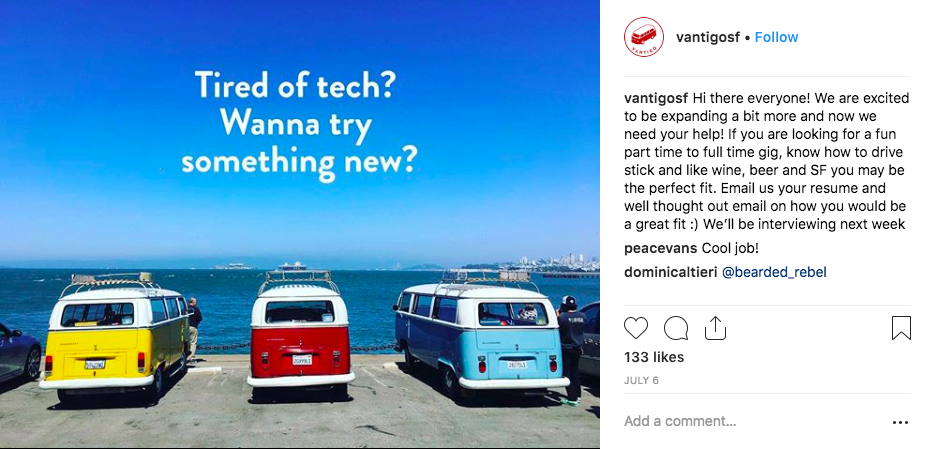
One of our social media job postings
CraigslistThis U.S.-based site is great for recruiting tour guides. It’s also pretty cheap — typically $150 a month. Be warned though, not all enquiries you get from these ads will be tour guides. You’ll have to sift through some random responses before you find the right candidate.Indeed, GlassDoor and LinkedInThese sites help me to distill my applicant pool when I’m looking to fill a more senior role. For example, if you’re looking for a General Manager — or similar — I highly recommend using these networks.Other operatorsIf your company is one of the best in town, it’s possible you may be able to snag some great talent from your competitors. When posting jobs on social media, keep your eyes peeled for responses from guides that are with another operator. Guides will often reach out to you through these channels if they’re unhappy.Friends and familyMy very first hire came from sending an email to my own network of friends and family. This is another free way to get your advertisement out there, and you may be more likely to find someone you can really trust. Just remember, it can be harder to let employees go when they have a personal link to you.
How to Interview and Hire a Guide
Training a new guide is always a challenge. There is no rule book - other than the one you write. If this is your seventh hire, then you may think you have it in the bag. But trust me, no matter how many hires you’ve made, the interview process can always throw you a curveball or two. Here are some things that have helped my interview processes go smoothly:It’s all in the detailsMake sure the job description is up-to-date and has all requirements listed, to screen out potentially unqualified candidates. My best example: all of our vehicles in San Fran are manual transmissions. Not listing that on my first job posting wasted a lot of my time. Use phone interviews wiselyTake time to develop some solid questions for a phone screen. A phone interview saves valuable time and can weed out weaker candidates without the need to bring them in. Come up with your own make or break criteria and make sure you cover it in the call.Tip: Check out some of my best phone screen questions in Peek's “Tour Guide Hiring Process” resources — find them at the bottom of this post!Ask the tough questionsI like to think of nightmare scenarios my guides have been in and ask candidates what they would do in those situations. Don’t hold back! Your guide will need to deal with unexpected situations (and questions!) all the time. This is your chance to see how they handle it.Be upfront about the challengesSure, you want to sell your company as a great place to work (it is!). But you should also let candidates know about the less *ahem* glamorous parts of the job. Taking out the garbage, cleaning up the shop, maintaining equipment. This way there’ll be no nasty surprises for new employees — and you can make sure you’re hiring someone who’s willing to pull their weight!Put them on the tourMake sure potential hires get some first-hand experience on a tour. This is a great technique which allows you to see how they interact with paying customers. It also gives one of your current guides the chance to give you their feedback on the candidate.Bring in your teamSpeaking of current guides, I see a lot of value in having a good portion of your team interview the person they are going to be working with. It helps you to create a like-minded team that supports each other — and avoids drama down the road.Probation, probation, probationSetting a probation period allows you a fail-safe in the case of a new hire not working out. You could also use it to create an incentive for your new guide to do a great job. Why not start them on a lower wage, and offer an increase once they tour on their own? That way, you’ll give them something to work towards.
What Makes a Great Guide?
When hiring, it’s a good idea to take time to remind yourself what you’re actually looking for. What qualities will your guide need to do the best job? Knowing what you’ll expect from your guides once they start will help you look out for key characteristics during the hiring process. I’ve learned a lot of lessons during my time as a guide — and a guide’s boss. Here are some of my best guidelines on what makes a great tour guide:Knowing what you know — and what you don’tIf there’s one thing I’ve learned in this business, it’s that customers have a lot of their own knowledge about random subjects. They also love to test you (watch out for the beer nerds!). I’ve found that people will respect you way more if you tell them that you don’t know the answer to their question, and you’re going to look it up on the break. The best part - next time someone asks you, you’ll be ready!Showing an interest in your guestsJust a few minutes of connecting with someone can make a huge difference and even result in a four or five-star review. Ask people on the tour for their story: how far have they travelled to be here? Where are they staying? People love to share, so make sure you’re not the only one talking.

Your guests make your tour — show them some love!
Retaining information from previous guestsYour guests will be coming from all over, and you’ll be amazed at how much you pick up about places you have never been. Example: if a guest tells you an architect who built something on your tour is from their hometown, remember it! When someone else comes on the tour from the same place, this is your chance to instantly make them more comfortable.Taking care of housekeepingA good guide answers questions before they are asked. Frequency of bathroom stops, how many tastings are included at breweries/wineries, how long the break will be. Walk through the itinerary and utilize tools such as the map along the way.Focusing on content your guests want to hearIf you get to know the group you’re with, you can understand what they are interested in. Is this their first time at a brewery? Maybe dial back the beer nerd speak. Keep it relevant and personalized.Making guests part of your tourSome guides hate having locals or experts on their tour. We love it! Have someone who was living in the city during a certain time? Stop the tour and ask them what it was like. They will be stoked to share their story, and you could even learn something new.Being politeOpen doors for people, use appropriate language, say please and thank you. It sounds simple, but a little courtesy goes a long way.Taking time to connect with the communityToo many times I have been on tours where the person at the tasting room or visitors center does not know the guide. I’ve even seen guides hide in their car during these parts of the tour. A good guide will go on a day off to get to know the people they see every day a bit better - if they’re known by the locals, guests will trust them more.Staying in plain viewIn the wine industry, a lot of guides hang out in their vehicles when people are wine tasting. While some wineries like it this way, you should always be checking in. It’s important for people to have some of their own time to explore, but it’s also important for you to be available for any questions that arise.Taking photos for guestsPeople often forget to ask for photos if they are behind the lens. Ask people if you can take a photo for them. They will remember the tour that much more.
How to Train a New Guide
Ok, so you hired the best person for the job. Now how do you train them? My approach is a little more organic than others. But with an average retention for year round guides of two and a half years, its been a good use of my time. Trust me, it’s worth going the extra mile! Here are some of the key steps:Let them jump right inHave the new hire start touring (along with your best guide) right off the bat. In my experience, it often takes a good month before someone has mastered our tours. They may be pretty rough in the beginning — even after a month — but hey, everybody has to start somewhere. The only way they’ll learn is by doing, so get them out there right away. Use your libraryThe person you hired should have an interest in what your company does. We have a library of books — new and old — all about the area we tour in, and we encourage all guides to brush up on their knowledge. Our guides often “nerd out” about fun new facts they learned. Your new guide will be a total sponge when they start, and will likely want to join in on the fun.Have them teach the content in their own wayI always make sure my guides know that the tour is what they make it. Sure, the content is super important, but they should always focus on what makes them excited. We do city tours in San Francisco and there is a lot of history to take in. If the guide is not excited about the content, the guests will see it.Encourage guides to tell their storyPeople love to hear stories about others almost as much as they love to tell their own. One of the easiest ways for a new guide to make a tour their own is to weave in their story. How did they get here? What made them fall in love with this place? Make sure your guide knows that it’s super important to focus on the personal side of a tour as well as the general content. Have them create their own tour or productThis one has always been a great success for me when training a new guide. Get your new guide to think of a tour they’d love to run, and have them set it up as if it were real. This allows the guide to literally see what it's like to put a tour or activity together from start to finish, with all the logistics behind it. The best part is, sometimes they think of something new that could be a big hit — win-win!
How to Retain a Guide
Retaining good guides takes a lot of work. It’s not an exact science, and I learn new ways to improve my retention rate every day. Here are some strategies that have really worked for me: In-service daysAround here, we call them District Days, or “D-Days”. These are paid days where you bring the team together once a month to learn something new or just to go have fun. We use these days to brush up on our skills and knowledge of districts, and it’s a great way to let the team connect better with each other.

Our D-Day on Angel Island!
Shake up your toursLetting the guides not say the same thing over and over again each day is a great way to keep them from the dreaded burnout. Having more than one tour and allowing guides to rotate will help them stay sharp. Even if a different tour is not as profitable, it could still save you money if it means your guides stay with the company longer.Respect themCreate a fair schedule and stick to it - but also try to make sure you give your staff flexibility. For example, I always allow my guides to take major holidays off if they want - with enough fair warning, of course.Create a bonus structureWe used to give bonuses in the form of payment. After learning how much the government taxes a bonus, we switched to a Paid Time Off (PTO) Bonus. For every 10 five-star reviews a team member gets, they accrue four hours of PTO. Everybody wins.
Wellness perksSimple things like paying for a birthday dinner, monthly 30 minute massages, or bike to work incentives can go a long way. Show your staff that you care about their personal wellbeing, as well as their professional development. Happy guides make happy customers — and a happy boss.
Little incentives go a long way!
Take an interest in your employeesTake time to understand what your guides’ backgrounds are. Why did they get into this line of work? What goals do they have? How does working for your company help them get there? Knowing your guides’ interests and ambitions will help you make sure they’re in the right role for them. Watch for signs of burnoutIf you see the signs of burnout, attack it right off the bat. A few key things to look for:
- They show up five minutes before a tour, and finish up super quick
- They complain dramatically if the tips are anything less than stellar
- They’re suddenly unwilling to cover any of their colleagues’ shifts
If it seems like they’re heading for the door, figure out a game plan. Make sure you’re doing everything you can on your end: adjusting their role, incentives, regular reviews. If they’re determined to move on, offer to help them with a new direction. By helping figure out their next steps, you’ll be amazed at the ability to get a couple more good months from someone.Great guides are an essential part of any tour company. They are the heart and soul of your operation, and the key to growing your reputation —- and your business. Finding a great, well-rounded guide can be a challenge. But, by putting your best efforts into hiring and training, you can help ensure that your guides reflect your company’s mission and do you proud.Want even more ways to make your tour guide hiring process go smoothly? Why not download our FREE hiring process tools, featuring candidate trackers, interview templates and exclusive interview questions from Erik! Simply fill out the form below to access your resources!

NEW INTEGRATION ANNOUNCEMENT: Peek and Groupon Are Teaming Up to Drive More Bookings
In recent years it’s become pretty clear that more and more consumers are choosing experiences over ‘stuff’. In fact, one study showed that 78% of Millennials would rather spend money on an experience over material goods. Why? Partly because 4/5 of them say that attending events makes them feel more connected to other people.That's why our friends at Groupon have invested in a full price marketplace for the millions of people coming to Groupon's website, looking for inspiration. This new marketplace has had great success so far and Peek is excited to partner with Groupon to give you access to these adventure seekers. We want as many people as possible to access your great experiences and create amazing memories. We'll be going live with this partnership at the beginning of next year.Why is this great news?This is great for our partners because it means the chance to showcase awesome tours and activities on a huge distribution platform. That means more online traffic, more bookings, and more revenue for tour operators. And the best part - you don’t have to do a thing! We will do all the hard work for you once you’re live on the Peek.com marketplace.Will it mean offering my tour or activity at a discounted rate? No. Groupon has traditionally been known for its deals and discounts, but this part of their online marketplace is different. All of our partners’ tours and activities will be listed at their full price to consumers.What does it mean for customers? More convenience, more delight, more memories! It’s now even easier for customers to find awesome tours and activities online. Groupon has millions of customers - they’ll now be able to discover the incredible experiences that partners offer even more easily.What is the commission structure associated with listing activities on Groupon?The activity price and your revenue is exactly the same whether an activity is sold on Groupon, Peek.com or Yelp. Only your standard Peek.com commission rate applies.What do I need to do? If you’re a partner, you don’t need to do a thing! We’ll keep you updated on what’s happening. All partners will be contacted as the partnership goes live with the next steps. Note: This is a completely voluntary integration! Just like our partnership with Google & Yelp, this is yet another option that Peek is providing to our partners to drive more bookings. You will have the ability to opt out of the integration if you would like. We will also send an email reminder before it goes live. In the meantime, you can simply contact our Partner Support team if you want to opt out.Not a Peek Partner yet? Want to find out more? Schedule your free demo here!

A Practical Guide to Improving Your TripAdvisor Rankings
In this post, digital marketing expert Chris Torres - director of the Tourism Marketing Agency - offers some key insights into TripAdvisor’s complex ranking system. He’ll run through some key factors that determine your ranking - and how to make sure it’s as high as possible! You may already know that TripAdvisor influences over 10% of all tourism spending. Every month, 455 million people use the site to find and book hotels, restaurants, experiences, and tour services. If your company ranks higher on TripAdvisor, you are guaranteed to receive more business. It’s one of the best ways to make your business more visible than your competitors. It can get confusing out there. SEO, social media, online reviews: it seems like everywhere you look there’s a another “guide” you just can’t get your head around. But this information is key if you want to market your company in the best way possible online.That’s why I’ve created this clear and simple rundown of how your TripAdvisor ratings work. Plus, you’ll find a few tips on what to look out for to make sure your rankings aren’t slipping.
The system is smart - don’t try to manipulate it
You know user reviews are the biggest ranking factor on TripAdvisor. The whole platform works on the premise that good services inspire good reviews from customers. The 600+ million reviews are the biggest determining factors when TripAdvisor’s algorithm ranks your tour, activity, or rental service. However, there are more ranking factors beyond reviews.In the past, new businesses used to jump to the top of the rankings when they received an influx of reviews. Other businesses saw this and tried to rig their reviews to shoot themselves to the top of the rankings. TripAdvisor noticed this, and knew that if the rankings could be manipulated, their platform couldn’t be trusted. They have since changed their algorithm to prevent ranking manipulation. What should you take away from this?It’s getting gradually harder to unfairly manipulate TripAdvisor’s rankings. So don’t even try it. You may even get a $3 million fine if your activity is seen as inherently misleading! Don’t waste time trying to trick TripAdvisor; put your efforts into earning your good ranking.
How does the TripAdvisor algorithm work?
TripAdvisor won’t let us fully understand how its algorithm works. But, we do know that it ranks your business based on three things: the quality, recency, and quantity of your reviews. Let’s look at each aspect in turn, and see why your reviews might be doing better or worse than you expected.
Quality
It sounds obvious: the more 4- and 5-star reviews you have, the better your ranking will be. However, the quality of your reviews is also based on word counts. A longer review is viewed as more beneficial than a shorter review. This is because a longer review provides more detail on the experience. If your guests are taking the time to write reviews longer than one word, it shows they have meaning - and TripAdvisor will deem them of higher quality.
Recency
How recently a review was posted is also important. New businesses can’t jump to the top of the rankings with new reviews anymore. But it makes sense that recent reviews tell TripAdvisor that your service is good right now. Not good two years ago. Only having old reviews may make it seem like your business has reduced in quality. It’s vital you’re getting up-to-date reviews to let TripAdvisor know you’re still doing a good job!
Quantity
Yes, the quantity of your reviews is still taken into account - just not to the extent that it once was. As I said before, this change has been made to prevent new businesses from shooting ahead of old, established businesses. It’s still a case of the “the more the merrier”, but you should never sacrifice quality for quantity.
There are no cheap and dirty TripAdvisor tricks
It used to be easier to get to the top of TripAdvisor’s rankings by using cheap and dirty tactics. This won’t work anymore. It may be tempting, but the risks simply aren’t worth it. Instead, make earning good reviews a constant goal for your business. Make sure your staff know how important reviews are to you. Why not empower them to offer free bonuses and discounts as olive branches to disgruntled customers? If you handle it right, it’s totally possible to transform a customer’s negative experience into a positive review!Check out this example below from San Francisco tour operator Vantigo:

Even though the customer didn’t actually get to go on the tour, they still ended up giving a 5-star review because of how the company handled the situation. Awesome! It’s also important to keep a constant eye on your TripAdvisor reviews. If you spot a bad review, it’s good to either reply or get in touch with the user to ask if you can make amends. Sometimes the user won’t be interested - but they often are, and your bad review could be turned into a good one.The upshot of all this: TripAdvisor is fair - and trying to be even fairer. It’s also providing constant updates to its algorithm over time. Knowing this, the best thing you can do is focus on the quality of your product or service. It’s the only surefire way to get those 5-star reviews rolling in and see your ranking soar!Want more tips from Chris? Keen to learn more about digital marketing relevant to the tourism industry? Why not sign up for his FREE 12 part marketing guide here!


